Gallery levels, grades and rewards
Separate FC 27 Gallery levels, set grades and tokens, view milestone rewards, and calculate the gap to your own next-level target.
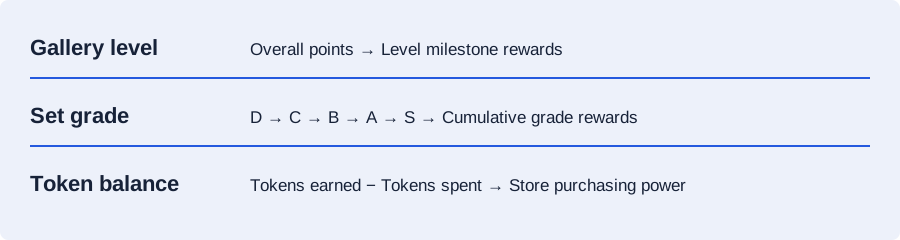
There are three numbers to keep apart: your overall Gallery progress, the grade of an individual set, and your Gallery token balance. Improving a set can help more than one of them, but they are not interchangeable.
Looking for Level 15? A player screenshot reports a 25,000,000-point target. See the evidence and calculate your remaining points.
Which target are you trying to reach?
| Track | What it measures | What to enter |
|---|---|---|
| Gallery level | Overall progress from completing and improving sets | Your current overall score and a reported or chosen points target |
| Set grade | A single set's D, C, B, A or S result | That set's present score and proposed improved score |
| Gallery tokens | Reward currency earned through set grades | Total tokens earned so far and a target on the same cumulative basis; each set's current and planned grade totals |
A set that reaches a higher grade directly can also claim its lower grade rewards. In the planner, enter the cumulative tokens already earned from that set as its current tokens, and the cumulative total obtainable at the proposed grade as its planned tokens. The planner subtracts the current value to find the new tokens; do not enter only the extra reward as the planned total.
Published level milestone rewards
These are the level milestones in EA's Gallery reward overview. Check the game for the full reward details and your claim status.
| Gallery level | Milestone reward |
|---|---|
| Level 5 | Holographic Squad Foundations Player |
| Level 10 | Holographic Base Hero Pick |
| Level 15 | Holographic Base ICON Pick |
| Level 20 | 88+ Holographic Base Hero Pick |
| Level 25 | 92+ Holographic Base Hero Pick |
The reward overview's approximate season schedule describes expected progression. It is not a point target to paste into a calculator or a guarantee of when you can obtain an item.
Reported points for Gallery levels
FUT.GG's in-game report supplies Levels 2–14; Albert's player screenshot supplies Level 15. These are third-party observations, not an official EA table. If your game shows points remaining instead of a target, add them to your current score.
| Level | Reported points |
|---|---|
| 2 | 5,000 |
| 3 | 25,000 |
| 4 | 125,000 |
| 5 | 500,000 |
| 6 | 750,000 |
| 7 | 1,250,000 |
| 8 | 1,500,000 |
| 9 | 2,250,000 |
| 10 | 3,000,000 |
| 11 | 5,000,000 |
| 12 | 7,000,000 |
| 13 | 11,000,000 |
| 14 | 15,000,000 |
| 15 | 25,000,000 |
| 20, 25 | Unconfirmed — no preset |
For example, 7,131,978 current points plus 3,868,022 remaining gives an 11,000,000 target. This is arithmetic from the Level 12 screen in the linked report, not a formula for other levels.
Try a reported target in the gap calculator. References are optional and editable; a calculated gap does not confirm your in-game level.
How many points do you need for Level 10?
FUT.GG reports 3,000,000 points for Level 10. Its in-game observations are separate from EA’s official milestone reward overview, which does not list point thresholds.
The Gallery route planner accepts your own target. That makes it useful for any level without assuming that level thresholds follow a straight line.
For the Holographic Base Hero Pick milestone, open the points gap calculator and choose Level 10. Enter your current points and choose the reported reference, or enter your own target, to see what remains.
How many Gallery points for Level 15?
The reported target is 25,000,000 points. Albert's Level 14 screenshot shows 15,010,009 current points and 9,989,991 remaining to Level 15. Adding those figures gives the target; it is a player observation, not an EA-published threshold.
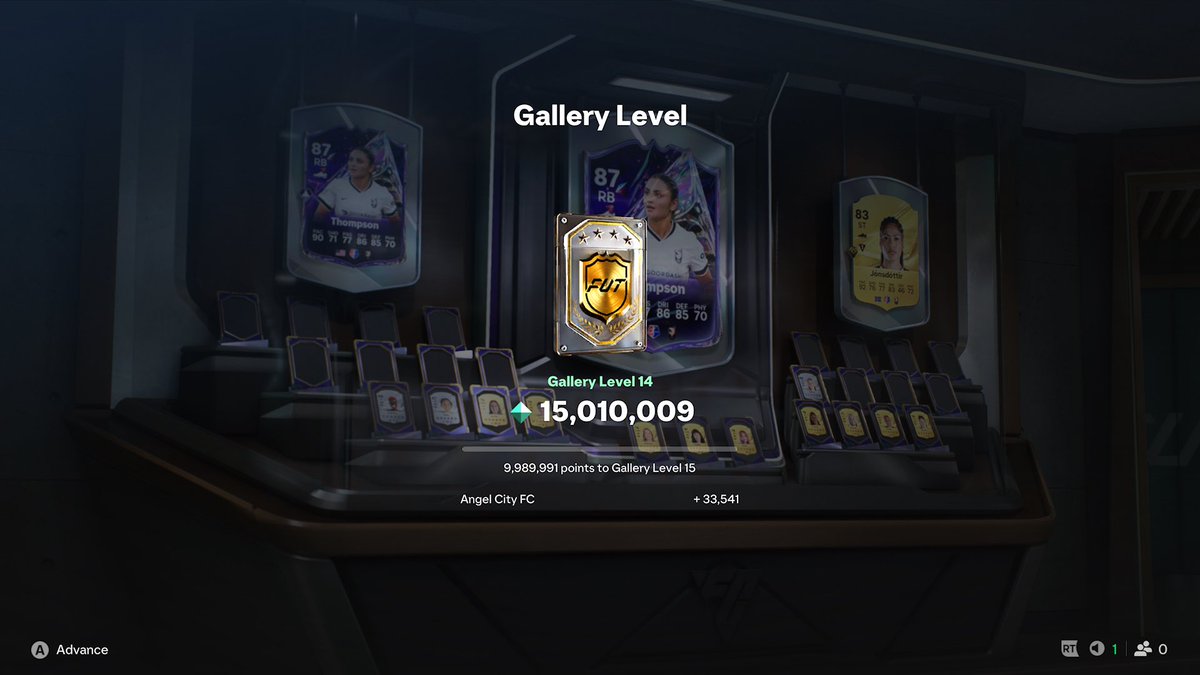
Level 15 has a Holographic Base ICON Pick milestone. Your overall Gallery points determine level progress; a large token balance does not substitute for those points.
- Copy your current Gallery points and choose the reported reference below, or enter your own target.
- Look for sets you can improve with cards already collected. Count the increase over each set's current score.
- Compare those gains with market upgrades you can buy within your trading balance. If a required card is unavailable, exclude it rather than planning around a purchase you cannot make.
The reference is optional and editable. Recheck your actual level after grading sets; a calculated gap does not confirm a reward unlock.
Calculate your next milestone gap
Player screenshot reference; editable, not an official EA threshold. Read the reference table.
Enter your current points and a target. Use a reported reference where available, or try your own value. The gap updates as you type.
Use these two totals in the route planner, then compare the upgrades you can actually complete. Add your own spending and buy / sell action limits when choosing a route. Your saved cards and upgrade options stay available when you return.
Work out the gap before choosing sets
Example: 300,000 more points
Your displayed current score is 2,700,000 and your chosen target is 3,000,000. The gap is 300,000. A set that moves from an already counted 100,000 to a planned 250,000 adds an estimated 150,000 toward that gap.
You still need another 150,000 from your entered upgrades. Re-enter your current totals after grading sets so the next plan begins from the progress actually displayed in your game.
Count only the positive improvement for a set that is already part of your starting total. Enter one proposed final result for each alternative upgrade; buying several alternatives for the same set should not count as several new sets.
When tokens are the real target
The planner compares cumulative tokens earned, rather than the spendable balance left after purchases. If you have spent tokens, add that amount to both your current balance and your desired balance before entering the current and target totals. The route planner's balance helper does this conversion for you without changing your cards or upgrade options.
Example: saving for a 400-token reward
You have 300 tokens left and have already spent 200. Enter 500 as current tokens earned and 600 as the target: 300 + 200 = 500, and 400 + 200 = 600. You need 100 more tokens.
If one set has already earned 20 tokens and its proposed grade would bring its cumulative rewards to 50, enter current 20 and planned 50. Its new contribution is 30 tokens.
A route with the biggest score gain is not automatically the route with the most useful token gain. Compare the new tokens from your proposed grades with the gap to your cumulative target.
Spend Gallery tokens now or keep a reserve?
Gallery Tokens carry over between Seasons. EA's developers say they do not expire or reset at a Season change, so you can keep a reserve instead of spending just because the Season ends.
Use the calculator to compare a purchase with the balance you want left. For the added League and Club Sets, see what Season 2 changes in Gallery.
Check a purchase against your token reserve
Use your spendable balance, the offer's current cost and the tokens you want left afterwards. Enter 0 if you do not want a reserve.
This comparison uses only the amounts you enter. Check the live offer's currency, cost, purchase limit and expiry in your game. It does not predict future offers.
For example, with 750 tokens, a 500-token purchase leaves 250. If you want 750 left for another reward, you need 500 more before buying. Keeping all 750 already meets that reserve. These are example amounts, not a current store listing.
For earning and claiming set rewards, follow the Gallery collection steps. Check EA's Gallery help and the offer in your game before choosing a purchase.
Are more Hall of FUT players coming?
EA's developers say they do not currently plan to expand the Hall of FUT player roster in FC 27. They do plan to feature the existing roster in a Hall of FUT Unleashed campaign. New versions of existing players and new names in the roster are different things.
| Plan | What you can use it to decide |
|---|---|
| Tokens carry over | You can keep an unused balance between Seasons. An individual offer can still expire. |
| Season 3 Store refresh | EA plans to refresh rewards, without new Hall of FUT items in that first refresh. A refresh does not promise a new player roster. |
| Hall of FUT Unleashed | The existing roster is planned to feature in this campaign. That answer does not specify how to obtain those items or promise you can buy them with Gallery Tokens. |
For a past-and-present squad, judge an available reward by whether you want to use it now. Saving tokens is an option, but a rumoured player or campaign is not a confirmed future Store offer. Compare a purchase and a retained balance with the token reserve calculator.
Read questions 9, 16 and 19 in the EA FUT Developer Q&A for the Store and roster plans. If you decide to earn more tokens, compare your entered Set upgrades in the route planner.
Before using a planned set result, check its Item Scores and tag bonuses. If First Owner is doing most of the work, the First Owner bonus guide explains why market purchases do not replace First Owner items.
See EA's FC 27 launch update for the Gallery milestone overview.